
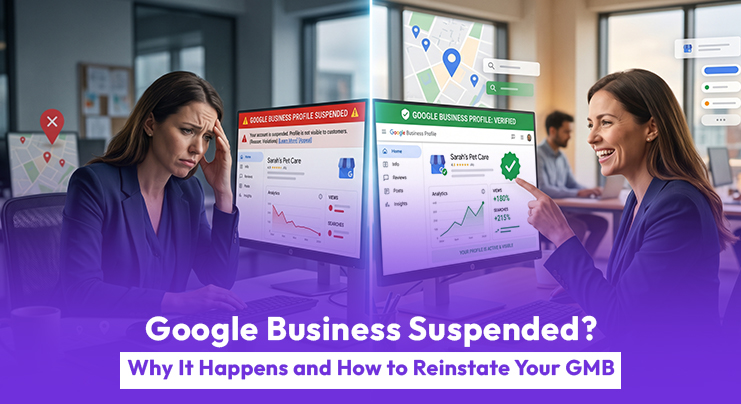
Is your Google Business Profile suddenly suspended, and your customers can’t find you on Google anymore? If yes, you’re not alone. Many businesses in Pakistan face this issue without understanding the exact reason behind it.
When your Google Business suspended notice appears, your visibility drops instantly. Calls decrease, walk-ins slow down, and your competitors start capturing your customers. Since Google Maps is a major lead source for local businesses, even a temporary suspension can directly impact your revenue.
The important thing to understand is this: a Google Business Profile suspended issue is serious, but it is fixable if handled correctly.
What Is a Google Business Profile Suspension?
A Google Business Profile suspension happens when Google removes or restricts your business listing from Search and Maps. This means your business either disappears completely or becomes unmanageable from your dashboard. In simple terms, your online storefront is either hidden or locked.
When your Google Business profile suspended status appears, you may notice:
- A “Suspended” warning in your dashboard
- Your business is missing from Google Maps
- An email from Google mentioning a policy issue
- Customers say they cannot find your business
This situation often creates panic because the impact is immediate. Calls drop, website traffic declines, and your lead flow slows down significantly.
For many businesses in Pakistan, this is equivalent to shutting down their main marketing channel overnight. In industries like healthcare, legal services, salons, and home services, where customers rely heavily on local search, this disruption can result in immediate revenue loss and reduced brand trust.
Another important point is that suspension does not always mean wrongdoing. In many cases, it is simply a verification or compliance issue that needs correction.
Types of Suspension
Soft Suspension
In a soft suspension, your listing is still visible to customers, but you cannot manage or edit it. This usually happens when Google requires additional verification or detects minor inconsistencies. Although less severe, it still limits your ability to update information, respond to reviews, or optimize your listing for better performance.
Over time, this can affect your rankings and customer engagement because your profile becomes inactive. Soft suspensions are often a warning signal. If ignored, they can turn into hard suspensions.
Hard Suspension
A hard suspension removes your listing completely from Google Search and Maps. Customers cannot find your business at all. This is more serious and requires a proper reinstatement process. However, even hard suspensions can be reversed if handled correctly with proper documentation and compliance.
Hard suspensions typically indicate stronger trust issues, so your appeal must be more detailed and supported with clear evidence.
Why Google Business Profile Gets Suspended (Even If You Follow Rules)
Many business owners believe that suspension only happens due to spam or fake listings. In reality, even genuine businesses in Pakistan face this issue due to small mistakes or system triggers.
Google uses automated systems along with manual reviews, and sometimes real businesses get caught in the process. These systems prioritize accuracy and trust, which means even minor inconsistencies can trigger a review.
Major Profile Changes
If you suddenly change your business name, address, phone number, or category, Google may flag your listing. Even small edits can trigger a review. Frequent changes within a short period can increase suspicion and lead to a GMB suspension. It is always better to make updates gradually and ensure they reflect real-world changes.
Virtual Offices or Shared Addresses
Many businesses in Pakistan operate from shared offices, co-working spaces, or home addresses. If your location cannot be verified properly, your listing may get suspended.
Google prefers real, physically staffed locations with clear signage and proof of operation. If your setup does not meet these expectations, your profile may fail verification checks.
Keyword Stuffing in Business Name
Adding extra keywords like “Best Plumber in Lahore Cheap Services” instead of your real business name is a common violation.
Even if it improves rankings temporarily, it increases the risk of suspension significantly. Google prioritizes accuracy over marketing language in business names.
Duplicate Listings
Creating multiple listings for the same business or targeting different areas without actual offices can lead to suspension.
Google treats this as manipulation and may remove all related listings. This can also damage your long-term local SEO performance.
Account-Level Issues
Sometimes the problem is not your business listing but the account managing it. If a connected account has violations, your profile may also be affected.
This includes agencies, freelancers, or previous managers. Regularly reviewing account access can help prevent such issues.
Algorithm Updates or Competitor Reports
Google regularly updates its system to remove spam listings. Competitors can also report your business. If multiple signals appear suspicious, your listing may be Google Business profile suspended temporarily, even if your business is legitimate. This is why maintaining compliance at all times is critical.
How to Fix GMB Suspension in Pakistan (Step-by-Step)
If your Google Business Profile is suspended, follow the correct process instead of making rushed decisions. A structured and calm approach increases your chances of successful reinstatement.
Step 1: Do NOT Create a New Listing
This is the biggest mistake. Creating a new profile can lead to permanent suspension and loss of reviews. Google may link the new listing with the suspended one, making recovery more difficult. Always focus on fixing the original listing.
Step 2: Identify the Real Issue
Check your email from Google and review your profile carefully. Look for:
- Incorrect business name
- Address issues
- Duplicate listings
- Wrong categories
Fix all problems before submitting an appeal. This step is critical for success because Google reviews whether violations have been resolved.
Step 3: Prepare Proper Documents
For GMB reinstatement in Pakistan, you need strong proof. This includes:
- Utility bills
- Business registration documents
- Tax certificates
- Shop signage photos
- Rental agreements
Make sure all details match exactly with your profile. Even small mismatches can cause rejection. Clear, high-quality images and properly scanned documents improve credibility.
Step 4: Submit a Google Business Profile Appeal
Use Google’s official appeal form and upload:
- Clear documents
- Storefront images
- A short explanation
Keep your appeal simple, professional, and factual. Avoid emotional language. Focus on explaining what was wrong and how you fixed it.
Step 5: Wait and Monitor
The reinstatement process usually takes 1–3 weeks.
During this time:
- Do not edit your listing
- Do not create duplicates
- Check your email regularly
In some cases, Google may request additional verification. Respond quickly and accurately if that happens.
Mistakes to Avoid During GMB Reinstatement
Most delays happen because of mistakes made after suspension. Understanding these mistakes can save time and improve your chances of approval.
Common Mistakes
- Creating a new listing
- Submitting an appeal without fixing issues
- Uploading incorrect documents
- Editing profile during review
- Writing emotional appeals
Additionally, many businesses fail to provide strong proof or ignore small compliance issues. These small gaps often lead to rejection.
Another common mistake is rushing the process. Taking time to prepare a strong appeal is always better than submitting quickly with incomplete information.
How to Appeal a Google Business Profile Suspension Properly
The appeal process is the only way to recover your listing. Doing it correctly improves your chances of reinstatement.
- First, carefully review the suspension email. Then fix all issues in your profile before submitting the appeal.
- Prepare strong documentation and ensure everything matches your business details. When writing your appeal, clearly explain what was wrong and what you fixed.
- A good appeal is clear, structured, and backed by evidence. Avoid unnecessary details and focus only on facts.
- If your appeal gets rejected, do not panic. Review the issues again, improve your documentation, and resubmit with stronger proof.
Get Expert Help for Faster Recovery
If you are unsure about the process or your appeal has already been rejected, professional help can save time and effort. A reliable GMB reinstatement service in Pakistan can handle the process more effectively.
Experts understand Google’s policies, identify hidden issues, and prepare strong appeals that increase approval chances. They also help avoid common mistakes that delay reinstatement.
For businesses that depend heavily on local leads, getting expert support can significantly reduce downtime and revenue loss.
Conclusion
A Google Business profile suspended issue can feel overwhelming, especially when your business depends on local search. However, the situation is completely recoverable with the right steps. By identifying the root cause, fixing all violations, and submitting a proper appeal, most businesses successfully regain their listing.
Consistency, accuracy, and patience are the key factors in this process. Avoid rushed decisions and focus on long-term compliance. If you want to avoid delays and improve your chances of success, working with professionals like Fulfillit can help you restore your visibility and get your business back on track faster.
FAQs
1. Can I recover my listing without documents?
In most cases, documents are required to verify your business. Without proof, Google cannot confirm your legitimacy. Providing proper documentation significantly increases your chances of reinstatement.
2. What if I don’t know the exact reason for suspension?
Google often provides general reasons, which can be confusing. In such cases, you should review your entire profile carefully.
Fix all possible issues before submitting an appeal to improve your chances.
3. Does changing location frequently cause suspension?
Yes, frequent address changes can trigger Google’s system. It may appear suspicious and lead to suspension.
Always update your address only when necessary and ensure it is verifiable.
4. Can I edit my profile after submitting an appeal?
No, editing your profile during the review process can delay your appeal. It may also trigger additional checks.
It is best to wait until you receive a response from Google.
5. Is GMB suspension permanent?
Not always. Most suspensions can be reversed if handled correctly. Permanent suspension usually happens only in cases of repeated or serious violations.