
If you run a local business in Pakistan maybe a café in Lahore, a plumber in Rawalpindi, a boutique in Karachi, or a hyperlocal delivery service in Islamabad you might think: “How can I get more customers without spending a fortune on ads?” That’s where a properly optimized Google Business Profile (formerly known as Google My Business, or GMB) comes in.
When done right, Google My Business Optimization works like a 24/7 digital storefront: visible on Google Search and Maps, ready to attract customers who are searching “near me” or “in [city]”. It’s basically free (you just need time and some effort), and for small/local especially Hyperlocal bussinesses ones it can be a game-changer.
In this guide, you will learn exactly what it means to optimize GMB (or Google Business Profile), Pakistan-specific tips, and a ready-to-use checklist. Let’s get started.
What is Google My Business Optimization and Why It Matters
What is gmb optimization? At its core, Google Business Profile is a free tool that lets you manage how your business appears on Google in search results and on Maps. You control your business name, address, phone number, website link, business hours, description, photos, services/products, reviews, and more.
Why is that important? Because many customers don’t search for a business by exact name they search for services and location. For example, “barber near me Lahore”, “electrician Gulberg Islamabad”, “best bakery Karachi”, etc. An optimized profile ensures your listing shows up in those local packssearches, in the “map pack,” and often above organic website results.
A well-optimized profile also builds trust. People can see your photos, reviews, opening hours, and contact info at a glance which helps them decide whether to call you, visit your shop, or hire you.
Step-by-Step: How to Optimize Your Google Business Profile for Pakistani Hyperlocal Brands
Here’s a straightforward, actionable gmb optimization guide you can follow to optimize your Google Business Profile. Think of it as a “do-it-yourself” checklist to build more visibility and leads.
1. Claim & Verify Your Profile
First, log into Google (ideally with a Gmail tied to your business), and search for your business. If it’s listed, click “Claim this business.” If not, add it. Then follow the verification steps Google might send a postcard, or provide email/phone verification options depending on region.
Verification is crucial without it, Google may not display your updates, and you can’t fully manage the profile.
2. Fill Out Complete & Accurate Basic Info (NAP, Hours, Website, etc.)
- Use your business’s real name avoid keyword stuffing or adding extra business-type keywords in the name; that’s against Google’s policy.
- Provide a local phone number (not a generic or foreign number). This helps Google verify legitimacy and improves trust for local customers.
- Enter your physical address / service area accurately. For home-based or service-based businesses (e.g. plumbers, delivery services), define service areas properly.
- Set correct business hours. If you have special hours (holidays, Ramadan, weekends), update them accordingly.
- Add your website (if any), or a social-media/fb/Instagram link if you don’t have a website anything that helps users get more info.
3. Choose the Right Business Category (Primary & Secondary)
Google offers thousands of categories picking the most relevant one helps Google understand what your business does and show you in relevant searches.
For example: If you’re a “home appliance repair,” pick exactly that rather than a generic “services.” If you have multiple services (e.g. plumbing + electrical repair), use primary and relevant secondary categories.
4. Write a Strong, Keyword-Rich Business Description (with Local Flavor)
In the description field:
- Describe what you do, in simple language your services, what makes you special, the areas you serve.
- Include relevant keywords and location names (e.g. “Lahore electrician”, “home delivery bakery Karachi”, “Islamabad plumber”) but naturally; don’t overstuff.
- You can also mention unique selling points (USPs): e.g. “24/7 emergency service”, “free home delivery”, “authentic local cuisine”, “original spare parts” etc.
This helps your listing match what customers in your area are actually searching for.
5. Add High-Quality Photos & Videos
Upload good photos of your shop outside/inside, products, team at work, before-after, service delivery, etc. If you’re a service-based or home-service business (plumber, electrician, repair, etc.), photos of your work help build trust.
If you can, add short videos they make your profile more engaging and trustworthy.
6. List Your Products / Services with Details
If you offer multiple services or products whether it’s “AC repair”, “home delivery”, “men’s clothing”, “wedding photography” list them clearly, with short descriptions, estimated price range (if possible), service area, etc. This helps potential customers quickly scan if you meet their requirements.
7. Encourage & Manage Customer Reviews & Ratings
Reviews are one of the most powerful signals for trust and ranking. Encourage satisfied customers to leave honest reviews on your profile. Even a few genuine 4–5 star reviews can significantly improve your credibility.
Respond to reviews (positive or negative) politely thank good reviewers; address complaints with transparency and willingness to fix issues. This shows you care and builds trust.
8. Use Posts / Updates / Offers / Q&A Features Regularly
Google allows you to post updates: offers, promotions, events, service announcements treat these like mini-social posts. They keep your profile active, signal to Google that your business is alive, and attract customer engagement.
Also, pay attention to Q&A (questions people might ask) answer them promptly and clearly. For hyperlocal businesses, this could be questions like “Do you deliver to Gulberg?” or “What are your working hours on Sundays?”
9. Ensure Consistency Across Web: NAP, Website, Directories
If you have a website, social media pages, directory listings (local directories), make sure the name, address, and phone number (NAP) match exactly across all places. Inconsistencies confuse customers and search engines.
Consistency builds trust and helps your local SEO efforts; mixed info may hurt your credibility in search results.
10. Monitor & Update Regularly Treat It as a Living Profile
Your business might grow, hours might change, new services might be added, or photos updated. Make it a habit to revisit your profile every few months (or after major changes) update business hours, add new photos, list new offerings, respond to new reviews.
Also monitor profile analytics (like how many customers clicked “Call”, “Get Directions”, “Website”) helps you see what’s working, and what needs improvement.
What Affects Your GMB Ranking and How Google Decides Who Shows Up First
When someone searches for a business or service in Google say “pizza near me Karachi”, “electrician Lahore”, or “best bakery Islamabad” Google uses a mix of signals to decide which listings to show. The main Google My Business Optimization factors are:
- Relevance — how well your business listing matches the search query (services offered, keywords, categories, description).
- Proximity — how close your business is to where the user is searching from (or the location they specify). This is why accurate address / service-area info is crucial.
- Prominence — how well-known or credible your business seems: reviews & ratings, profile completeness, photos, how active you are, maybe even presence on other directories / citations / website SEO / backlinks.
For a Pakistani or hyperlocal business, you can influence relevance, completeness, prominence but proximity depends on your physical address. That’s why correct address/service-area, local keywords and good profile quality is critical with right google my business optimization service.
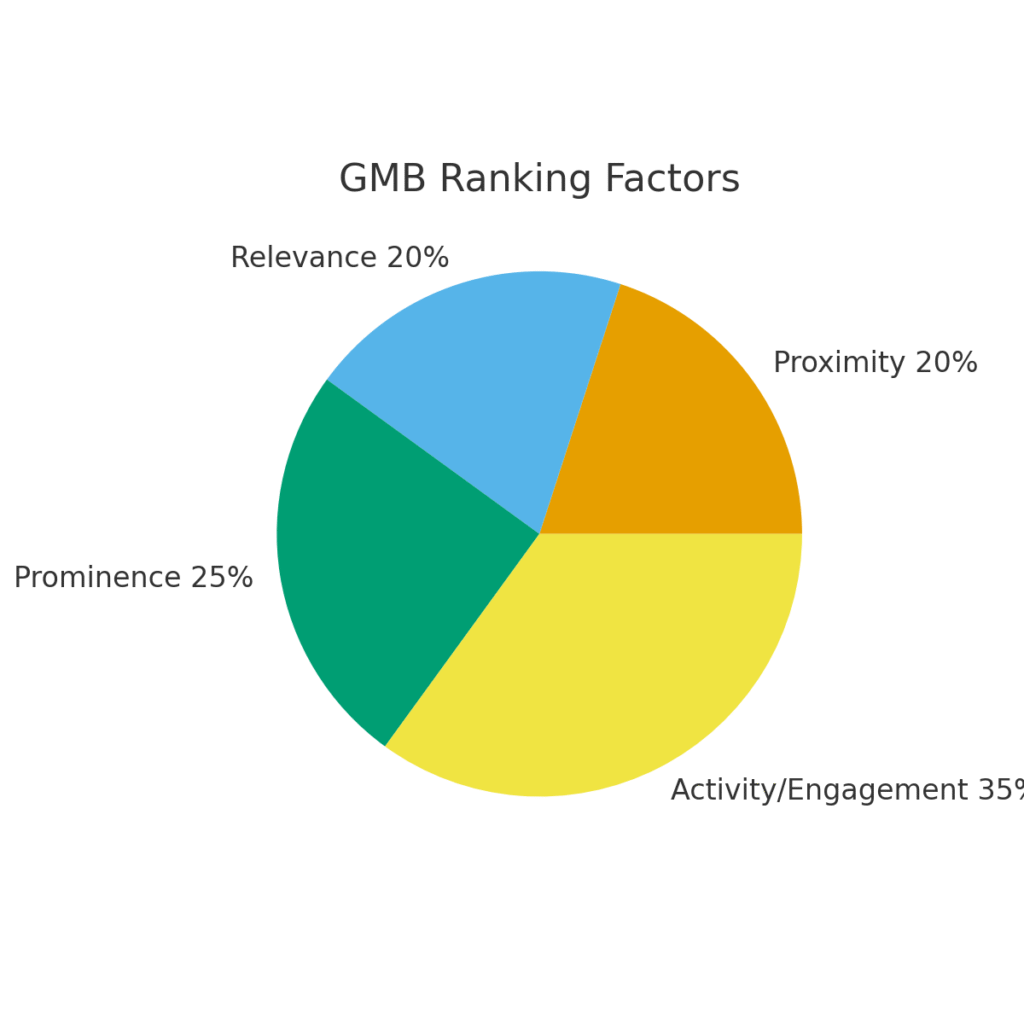
Additionally, “activity & signals” such as recent posts or updates, fresh photos, recent reviews can help boost your standing.
Pakistan and Hyperlocal-Specific Tips to Stand Out Locally
Since many existing GBP/ Google My Business Optimization guides are global, here are some localized considerations for businesses in Pakistan (or similar markets):
- Use appropriate local language/terms: if you expect customers to search in Urdu or Roman Urdu and English (e.g. “cap kota Lahore”, “mehandi artist Islamabad”, “ghar baithe haircut Lahore”), consider including common local keywords naturally in your description or services.
- Mention city/neighborhood names: like “Lahore”, “Gulberg”, “Faisalabad”, “Rawalpindi”, “Karachi Saddar”, etc. This helps with proximity/relevance.
- Define service-area clearly: for service businesses (home repair, delivery, etc.), mention which areas you cover: e.g. “Serving Lahore, surrounding areas up to 20 km”, “Delivery across Islamabad & Rawalpindi”. This helps set expectations and helps visibility in “near me / city and service” searches.
- Encourage customers to leave reviews: word-of-mouth and personal recommendations matter a lot in local markets. Good reviews help build trust and ranking for google my business page optimization.
- Use real photos or videos of your work: customers often appreciate seeing actual work and context. This helps build authenticity (important in local markets where people may rely on reputation).
- Use “Offers / Promotions for local engagement: like “Ramadan discounts”, “weekend sale”, “free delivery in Lahore”, etc. This can attract more attention and conversions.
- Update regular changes local holidays, timings: e.g. adjust hours for religious holidays, local events help maintain reliability and avoid negative customer experience.
Quick Google My Business Optimization Checklist to Follow
| Objectives | Why It Matters |
| Claim & Verify your GMB listing | Without verification, your changes may not show up / profile can’t be fully managed |
| Fill in correct business name, address, phone number, website, hours | Accuracy builds trust and ensures local visibility |
| Choose accurate primary & secondary categories | Helps Google categorize & show you for relevant searches |
| Write a clear, keyword-optimized business description (with local flavor) | Improves relevance & helps local search ranking |
| Add high-quality photos/videos (storefront, products, services, team, work samples) | Builds credibility and trust with customers |
| List your products/services with details & (if possible) service area / pricing range | Helps customers decide quickly if you match their needs |
| Encourage customers to leave honest reviews; respond to reviews | Reviews significantly affect trust and ranking |
| Post updates/offers regularly, engage in Q&A | Signals activity, keeps profile fresh and relevant |
| Ensure NAP consistency across web, directory listings, social, website | Maintains trust, avoids confusion / conflicting info |
| Regularly monitor & update profile (hours, services, photos, new reviews) | Keeps profile accurate helps maintain ranking & user trust |
Final Thoughts: Google My Business Optimization in 2025
Google My Business Optimization in Pakistandoesn’t need to be complicated or expensive. For local and hyperlocal businesses in Pakistan, it’s one of the most powerful and underused tools to get discovered and win more customers.
If you follow this guide and treat your GMB profile as a living digital storefront adding accurate info, photos, services, reviews, and staying active you will boost your visibility, build trust, and likely get more calls, visits, and sales.
Ready to rank high on google? Contact Fulfillit best creative digital marketing agency providing expert plans for gmb optimization services in Pakistan.
FAQs about Google My Business Optimization
What does GMB stand for in SEO?
GMB stands for Google My Business though recently Google has rebranded to “Google Business Profile (GBP)”. It’s the free Google tool that lets you manage how your business appears on Google Search and Maps.
What is the cost of GMB optimization?
If you do it yourself GMB/ Google My Business Optimization is free. The only cost is time and effort. You only pay if you hire an agency or freelancer to optimize/manage your profile.
What is GMB used for?
It’s used to make your business visible on Google Search & Maps for users looking for services/products in your area. People can see your address, hours, photos, reviews, call you, get directions sometimes without visiting your website.
How to get a 4.9 Google rating for your bussinesses?
Focus on delivering excellent service/products. Ask happy customers to leave honest reviews. Encourage feedback. Respond politely to reviews (good or bad). Maintain transparency and consistency. Avoid fake reviews they can backfire.
What are the Google My Business Optimization and gmb rankings factors?
Main factors: relevance (how well your profile matches the user’s search), proximity (how close you are to the user), and prominence (reviews, completeness of profile, activity, external signals like citations/backlinks). Activity (posts, updates, responding to reviews) and profile completeness also play a big role.