
In today’s digital world, businesses that don’t show up in Google search results miss out on millions of potential customers. That’s where Google Search Console (GSC) comes in a free, powerful toolkit directly from Google that helps you understand how your website is seen by Google, diagnose issues that hurt your search visibility, and improve your SEO strategy to attract leads.
Whether you are launching a new website, auditing SEO performance, or managing multiple properties, this guide explains everything you need to know about what Google Search Console is, how to set up and use your account, and how it helps your business thrive online.
Table of Contents
- What Is Google Search Console?
- Why GSC Matters for Businesses
- How to Create & Verify Your Google Search Console Account
- How to Add Site to Google Search Console (Step-by-Step)
- Dashboard Breakdown — Key Reports You Must Use
- How to Use Google Search Console for SEO Growth
- Checklist: Add Google Search Console to Shopify & Other Platforms
- Common Tasks You’ll Do in GSC
- Comparison: GSC vs Google Analytics
- Bonus Tips for B2B SEO Success
- FAQs
What Is Google Search Console?
So exactly what is Google Search Console is a free web service from Google that helps website owners, SEO professionals, and business marketers understand how their site performs in search results. It reveals what keywords your site ranks for, how often it appears in search, how many clicks it gets, and where technical issues might be harming your visibility.
Think of it as a direct communication channel with Google about your website’s health in search.
Yes, you can show up in Google search without GSC, but you won’t know WHY your site isn’t ranking or how to fix it.
Why GSC Matters for Businesses Specially for SEO-Optimized Brand Websites
For B2B companies, your website isn’t just a marketing asset it’s a lead generation engine. Here’s how Google Search Console helps:
Understand Organic Search Performance
You can see:
- Top search queries that bring traffic
- Which pages are ranking
- Your average position for specific keywords (e.g., what is Google Search Console, Google Search Console help)
This insight uncovers opportunities you might otherwise miss.
Spot and Fix SEO Issues
GSC alerts you to:
- Crawl errors
- Sitemap problems
- Security issues
- Manual penalties from Google
These help keep your site healthy and searchable.
Improve Click-Through Rates
If pages are appearing but not getting clicks (low CTR), you can update titles and meta descriptions to attract more clicks from searchers a key SEO tactic.
Submit Sitemap & Manage Google Crawl
Submitting your sitemap helps Google find pages faster (especially new content) and ensures important pages are indexed.
Benchmark Technical SEO & Performance
GSC shows data about core web vitals, crawl stats, mobile usability and more critical if you’re aiming to scale visibility.
How to Create and Verify Your Google Search Console Account: Step by step Tutorial
Let’s walk through how to get GSC up and running:
Step 1 — Sign In
Go to Google Search Console and click “Sign in” with your business Google account.
Step 2 — Add a Property
You’ll see two options:
✔ Domain Property – Tracks the entire domain (all subdomains, http/https)
✔ URL Prefix Property – Tracks only the exact address
Domain properties are recommended for most businesses due to wider coverage.
Step 3 — Verify Ownership
Google must verify that you own or control the site. Options include:
- Adding a DNS record
- Uploading an HTML file
- Adding a meta tag
- Verifying via Google Analytics or Tag Manager
- Once verified, you gain access to GSC data.
For a simple and practical explanation, you can also check our white label SEO services in Pakistan guide to understand how agencies manage SEO work more easily.
How to Add Website to Google Search Console: A Quick Guide
Once signed in and verified, you’ll want to add your website as a property:
- Sign into Google Search Console login
- Click “Add Property”
- Enter your URL exactly (including https://)
- Verify ownership through one of the recommended methods
- Click “Continue”
- Visit “Sitemaps” and submit your sitemap (e.g., /sitemap.xml)
Tip: A correct sitemap helps Google crawl and index pages properly. Explore Fulfillit SEO services and get started with your bussiness SEO and scale 10x.
PICTURE HERE
GSC Dashboard Overview: Key Features You Need to Know
How to give access to google search console? Once your property is added and google search console verification is done, the dashboard reveals powerful reports.
Performance Report
Shows:
- Total clicks
- Total impressions
- Average position
- Click-through rates (CTR)
It also breaks down performance by:
✔ Queries (keywords)
✔ Pages
✔ Countries
✔ Devices
✔ Search appearance types
This is key for keyword strategies like how to use Google Search Console for SEO and average position Google Search Console.
URL Inspection Tool
Enter individual URLs to see:
- Indexing status
- Crawl issues
- Canonical versions
- Errors that prevent a page from showing in search
This solves questions like why isn’t my page indexed?
Index Coverage
Shows:
✔ Pages indexed
✔ Errors blocking pages
✔ Pages excluded from index
This helps you monitor whether crucial pages like services or product pages are being crawled properly.
Sitemaps Section
Here you submit your sitemap and see how many pages Google discovered from it.
Mobile Usability
See whether any mobile-related issues are harming user experience on phones and tablets.
Security & Manual Actions
GSC will alert you if:
- Your site has been manually penalized
- Security issues like malware are detected
Prompt action here prevents loss of search visibility.
Links Report
Shows internal and external links essential for link building and understanding where backlinks are coming from.
How to Use Google Search Console for SEO Growth: Important Insights to Apply
Here’s how you leverage GSC data for real SEO results:
Keyword Insights
Look at your queries report to see what terms your site already ranks for. Then optimize pages targeting valuable keywords like google search console help, google search console sitemap, or google search console seo audit.
Fix Crawling & Indexing Issues
How google search console crawl works if pages are marked as “Submitted but not indexed”, the URL Inspection tool tells you why. This usually means you need to fix technical errors and request indexing.
Enhance CTR
If a page gets lots of impressions but low clicks:
✔ Improve meta title
✔ Rewrite meta description
✔ Add schema markup to enhance search appearance
Monitor Core Web Vitals & UX
Google search console api documentation reports adoption of Google’s page experience metrics crucial for SEO. Faster load times mean better ranking potential.
Checklist: How to Add Google Search Console to Websites from Shopify to Other Platforms
Whether your site is on Shopify, WordPress, or custom CMS, the steps are similar:
✔ Create a Google Search Console Admin account
✔ Add property (URL)
✔ Verify ownership
✔ Submit sitemap
How to add google search console to shopify:
- Use the HTML tag verification method
- Or verify via Google Analytics tracking already installed on Shopify
How to remove property from Google Search Console?
To remove a property, open Google Search Console, select the property, go to Settings → Remove property, and confirm. Only property owners can remove a site, and this does not affect your website’s search rankings or indexing.
To get started with your bussiness website and SEO journey contact Fulfillit for complete website SEO audit today!
Google Search Console vs Google Analytics: Key Difference
Here’s a quick difference between google analytics and google search console might be useful for B2B marketers:
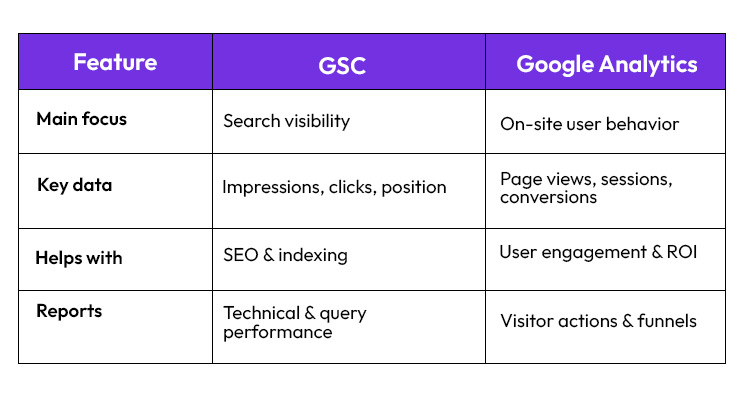
Note: Both tools are free and should be used together for maximum insight.
Benefits of Google Search Console and Tips for B2B SEO Success to Increase Efficiency to attarct leads
Target High-Impression Low-Ranking Pages: The fastest growth opportunities are pages containing more impressions, but with rankings between positions 8-20. Minor improvements such as perfect headings, links within a page, and updated texts can take them to the first page and grow the number of qualified traffic considerably.
Monitor Keyword Trends on a quarterly basis: Check the performance data of Google Search Console after every 90 days to determine the increasing, decreasing, and emerging keywords. It is more beneficial to update content according to actual search trends, so your pages will be in line with the buyer intent and enhance the generation of leads in the long run.
Focus on the International and Multi-Market Visibility: When your company has international customers, check the country based performance statistics in GSC. This assists in the discovery of markets that are visible but not active thus enabling you to localize content and reap international B2B leads.
Stakeholder SEO Reporting with GSC API: Google search console API enables you to automatize performance reports, alerts and key word monitoring. Automation will save time, enhance accuracy and give teams time to concentrate on strategy and conversion optimization rather than manual reporting.
Conclusion: Make Google Search Console Your SEO Power Tool
Google Search Console is more than just a webmaster tool it’s a strategic SEO resource that helps businesses track performance, fix technical issues, and uncover new opportunities for growth. With proper setup and regular use, GSC will empower your team to make data-driven decisions and grow organic traffic over time.
At Fulfillit, we specialize in helping businesses harness tools like Google Search Console international targeting to fuel SEO success and lead generation. Ready to unlock more organic traffic and conversions? Let’s get started.
FAQs
1. What is Google Search Console used for?
It’s used to monitor and improve your website’s presence in Google Search console add property, track keywords, fix errors, and submit sitemaps all essential for SEO. Also you can take some google search console certification and courses for better understanding.
2. How to add website in google search console for my bussiness?
Sign in, click Add property to google search console verify ownership, and submit your sitemap. That’s how you add your site to GSC.
3. Is GSC better than Google Analytics?
The google analytics and search console serve different purposes: GSC focuses on search visibility, while Analytics tracks user behavior on your website. Use both for best results.
4. How often should I check Google Search Console?
Check weekly add sitemap to google search console to catch issues early and monitor SEO trends and that’s the real google search console meaning.
5. Can businesses track SEO performance with GSC alone?
Yes especially for keyword rankings and technical SEO with disavow google search console but pairing it with Analytics gives a full picture of user behavior and conversions.